The laptop is barely thicker than a paperback, and it is running a game that would have melted a desktop a decade ago. The fan is whispering, the keyboard is cool under your fingers, and somewhere inside, a chip the size of a postage stamp is throwing off more heat per square centimetre than a kitchen hotplate. Something has to carry that heat away, and there is almost no room to do it in.
That something is a vapour chamber. It is a flat, sealed plate of copper, usually no thicker than a coin, sitting directly on top of the processor. Inside it, a tiny amount of water boils, condenses, and boils again, thousands of times a second, moving heat from the chip to the edges of the plate faster than solid copper ever could. It has no moving parts, makes no noise, and asks for nothing — yet it is the reason thin laptops can run at full speed without throttling to a crawl.
Open a flagship gaming laptop or a high-end ultrabook and you will find one, pressed between the processor and the heat pipes, doing the hardest job in the machine. The numbers on its spec sheet are not decoration: they describe how much heat it can move, how flat it must stay, and how close to boiling it is allowed to run. Here is what they mean.

How It Works
Step 1: Heat hits the evaporator
Everything starts at the hot spot — the small patch of the chamber directly above the processor die. The chip can dump 45 watts or more into an area smaller than a fingernail, and the copper wall of the chamber picks that heat up by conduction. Because the inside of the chamber is held at a partial vacuum, the water inside boils at far below 100 degrees Celsius, sometimes as low as 40 or 50. The moment the wall gets hot, the liquid touching it flashes into vapour.
Step 2: Vapour spreads the heat
Vapour is the chamber’s great trick. Unlike solid metal, which carries heat slowly from molecule to molecule, vapour races across the whole plate in a fraction of a second, carrying its load of heat with it. The vapour spreads out from the hot spot in every direction, filling the chamber evenly, so the heat that started in one tiny square centimetre is now spread across the entire plate. This is why a vapour chamber can cool a chip far better than a copper slab of the same size — it moves heat sideways almost instantly. Keeping a chip cool under load is the same problem tackled in our guide to cooling for sustained performance, where the heat has nowhere to hide.
Step 3: Condensation at the cool edges
At the edges of the chamber, away from the chip, the plate is cooler — pressed against heat pipes or the laptop’s fin stack, with air from the fan passing over it. When the vapour reaches these cooler walls it condenses back into liquid, giving up the heat it carried. The fins and the fan then push that heat out of the laptop entirely. The chamber itself never gets a chance to overheat, because the cycle keeps resetting: boil, spread, condense, repeat.
Step 4: The wick pulls the liquid back
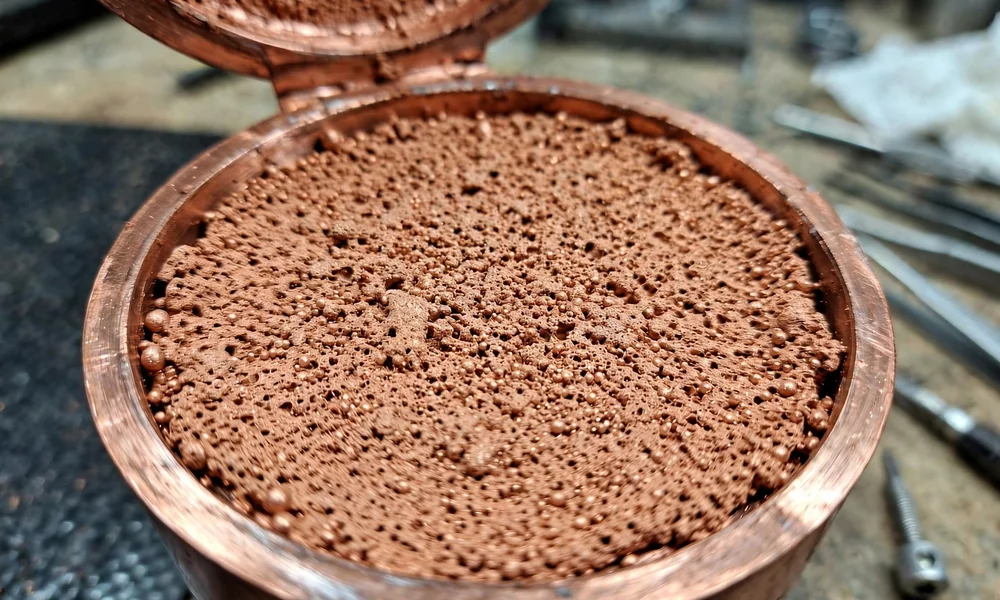
Condensed water has to get back to the hot spot, and it has no pump to help it. Instead, the inside of the chamber is lined with a wick — a layer of sintered copper powder, fine mesh, or tiny grooves, full of microscopic pores. Capillary action draws the liquid through these pores like water climbing up a paper towel, dragging it back to the evaporator against gravity if needed. The wick is the chamber’s circulatory system, and its pore size decides how fast the liquid returns and how much heat the chamber can handle before it dries out.
Step 5: The dry-out limit
Every vapour chamber has a ceiling. Push more heat in than the wick can return liquid for, and the evaporator runs dry — the hot spot has no water left to boil, and temperatures spike in seconds. This dry-out limit is the most important number on the spec sheet, because it decides whether the chamber can cope with a processor’s turbo boost or only its steady-state load. Good laptop designs keep the chip’s peak heat comfortably below the chamber’s limit, which is why the same processor can run faster in a laptop with a bigger chamber. The display that shows those temperatures works on principles explained in our guide to OLED display panel specs, where every number on the screen has a physical meaning.
Step 6: Sealing and flatness
None of this works unless the chamber is perfectly sealed and perfectly flat. A single leak lets air in, ruins the vacuum, and stops the water boiling at low temperature. A warped plate leaves an air gap over the chip, and air is a terrible conductor of heat. So chambers are made from two sheets of copper, pressed, brazed, and evacuated, then filled with a precisely measured dose of deionised water and sealed shut. The finished plate is checked for flatness to within a fraction of a hair’s width — a tolerance that would be familiar to anyone who has read about the challenges of machining titanium, where a few microns decide success or failure.
Laptop Vapour Chamber Specs
| Specification | Typical range |
|---|---|
| Thickness | 2 to 4 millimetres |
| Material | Copper, sometimes with a nickel finish |
| Working fluid | Deionised water |
| Internal pressure | Partial vacuum, well below atmospheric |
| Heat capacity | 40 to 150 watts, depending on size |
| Effective thermal conductivity | 5,000 to 50,000 watts per metre-kelvin |
| Wick type | Sintered copper powder, mesh, or grooved |
| Operating temperature | 40 to 100 degrees Celsius |
| Weight | 30 to 120 grams |
What Does a Vapour Chamber Cost?
A vapour chamber is not a part you buy off the shelf — it is built into the laptop, and its cost is hidden inside the price of the machine. As a component, a small chamber for an ultrabook is estimated at $5 to $15, a larger gaming-laptop chamber at $15 to $40, and a custom-shaped chamber for a flagship machine at $40 to $80 or more. Prices are estimates only and vary with size, wick type, and production volume. Compared with the heat pipes it replaces, a vapour chamber costs several times more — which is why you only find them in machines where thinness and sustained performance matter enough to pay for them.
A Rare Fact
The vapour chamber in a laptop is a direct descendant of the heat pipes that cool satellites in orbit. Heat pipes were developed in the 1960s for spacecraft, where there is no air to carry heat away and no fan to help. Engineers needed a way to move heat across a vacuum, so they sealed a little water inside a tube and let it boil and condense in a loop — the same cycle in your laptop. The technology went from keeping instruments alive in space to keeping a gaming laptop cool on a desk, without changing its basic idea at all.

A vapour chamber looks like a plain copper plate and behaves like a tiny weather system — water boiling, vapour racing, droplets condensing, and a wick pulling it all back for another round. Learn to read its numbers, and the cool keyboard of a thin laptop stops being a mystery.