A modern laptop is thinner than a paperback book, yet inside it a processor can throw off more heat than a small kettle. The answer is a cooling part so flat you could mistake it for a sheet of metal, and so effective it can move heat faster than solid copper. It is called a vapour chamber, and it is the reason thin laptops can run games that once needed a desktop.
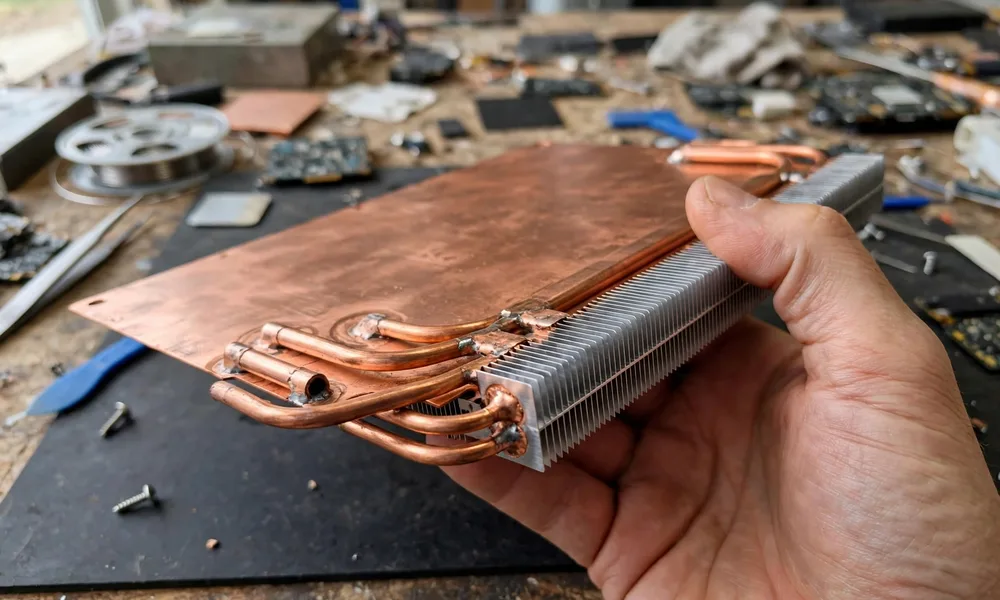
A vapour chamber is a sealed, flat copper envelope, a few millimetres thick, with a tiny amount of water inside and a wick lining its walls. Heat from the processor boils the water, the vapour carries the heat away, it condenses somewhere cooler, and the wick pulls the liquid back to start again. This is how a laptop vapour chamber works.

How It Works
Step 1: Spreading the heat across the whole plate
The vapour chamber sits directly on top of the processor and the graphics chip, the two hottest parts of the laptop, pressed against them with thermal paste. Because the chamber is a flat plate, often covering most of the laptop’s base, it touches the chips over a large area and spreads their heat sideways across the whole plate instead of letting it pile up in one hot spot. A traditional heat pipe can only carry heat along a thin tube; a vapour chamber carries it in two dimensions, across a sheet.
Step 2: Boiling a tiny amount of water
Inside the sealed chamber is a small amount of pure water, far less than a teaspoon, and the air has been pumped out, so the pressure inside is very low. At low pressure, water boils at a much lower temperature than 100 degrees Celsius, which means the heat of the processor is enough to turn it into vapour. When the processor heats up, the water on the hot spot flashes into vapour, absorbing a large amount of heat as it does so.
Step 3: Carrying the heat as vapour
It rushes away from the hot spot towards the cooler parts of the chamber, near the edges where the fans blow, moving at high speed and carrying the heat with it. Because vapour moves freely in all directions inside the flat envelope, the heat spreads evenly and quickly, and the whole plate settles at a nearly uniform temperature. A processor that would throttle itself to avoid overheating can keep running at full speed, because the chamber keeps pulling the heat away as fast as the chip makes it.
Step 4: Condensing back to liquid
At the cooler edges of the chamber, the vapour gives up its heat to the copper wall and condenses back into liquid water. This is the part of the cycle that depends on the rest of the cooling system: a vapour chamber does not make heat disappear, it only moves it, and the fans still have to carry it out of the machine. The same heat-moving logic drives the cooling in a gaming machine, where the gaming GPU it cools is built to run hot for hours at a time.
Step 5: Returning the liquid through the wick
Once the water has condensed, it has to get back to the hot spot, and it cannot fall there, because the chamber may be upside down or on its side. The return journey is made by the wick, a layer of sintered copper powder or fine copper mesh lining the inside walls of the chamber. The wick acts like a sponge, pulling the liquid along by capillary action, the same force that draws water up a paper towel.
Step 6: Keeping the chamber sealed for life
A vapour chamber only works if it stays sealed. If air leaks in, the pressure rises, the water stops boiling at low temperature, and the chamber becomes a flat piece of copper, no better than the metal it replaced. The edges are welded or brazed shut in a vacuum, and the fill tube, the tiny pipe through which the water was added, is crimped and soldered closed. The lens that shows the user what the laptop is doing has its own hidden engineering, as explored in how VR headset lenses work, but the chamber stays invisible, doing its job where no one can see it.

Step 7: Knowing when the chamber is the right answer
A vapour chamber is not the answer for every laptop. It costs more than heat pipes, it is harder to make, and it only earns its keep when the processor is powerful enough to need it. Thin gaming laptops, high-end ultrabooks and flagship phones are where it appears, in machines that must be slim and fast at the same time. The numbers that define it, its thickness, its heat capacity and its limits, are the same kind of figures engineers publish for every thermal part, as in the laptop vapour chamber specs that list what each chamber can carry.
Specs
| Specification | Typical figure |
|---|---|
| Material | Sealed copper envelope |
| Thickness | About 2 to 3 millimetres |
| Working fluid | A small amount of pure water |
| Internal pressure | Near-vacuum, so water boils at low temperature |
| Wick | Sintered copper powder or fine copper mesh |
| Heat transfer | Two-dimensional, across the whole plate |
| Moving parts | None; the cycle is driven by heat alone |
| Used in | Thin gaming laptops, ultrabooks and flagship phones |
Price
A vapour chamber is a component inside a laptop, not a product sold on its own, so there is no retail price for one. As an estimate, a laptop vapour chamber generally costs the manufacturer in the region of $10 to $40, depending on its size and complexity, against a few dollars for a set of heat pipes — these are estimates, and the true figures are commercial secrets. The laptops that carry them are the ones where the cost is justified: thin gaming laptops typically sell for roughly $1,000 to $3,000, also an estimate.
A Rare Fact
The vapour chamber descends from the heat pipe, invented in 1963 by George Grover at the Los Alamos National Laboratory in the United States. Grover was working on cooling nuclear reactors, and he realised that a sealed tube with a little liquid inside could move heat far better than any solid metal. The heat pipe went into spacecraft, then into computers, and engineers later flattened it into a plate to make the vapour chamber.
From a flat copper plate to a silent cycle of boiling and condensing that repeats thousands of times a second, the laptop vapour chamber works by letting water do what metal cannot: carry heat quickly, evenly and without moving parts. It is invisible, it never needs servicing, and the only sign it is there is a laptop that stays fast when it should have slowed down. In a machine where every millimetre is fought over, the vapour chamber wins its space by being the thinnest way to move the most heat.


