A solid-state drive has no moving parts, makes no sound, and can be dropped on a desk without a flinch — yet inside it sits some of the most delicate engineering in a modern computer. Where an old hard drive spun a magnetic disc thousands of times a minute, an SSD stores your photos, games, and documents as tiny charges trapped inside billions of microscopic cells. Each cell is smaller than a speck of dust, and a single drive can hold trillions of them. Building one is a quiet, dust-free ballet of robots, ovens, and light.
The surprising thing about an SSD is how simple it looks from the outside: a slim rectangle of metal or a bare circuit board the size of a stick of gum. Inside, though, the work is anything but simple. Memory chips must be stacked, wired, and tested to perfection, because a single faulty cell can corrupt a file. Here is how a solid-state drive is made, from a bare silicon wafer to the drive in your laptop.

How It’s Made
Step 1: Making the NAND memory wafers
It starts with NAND flash memory, the chips that actually store data. Like a processor, NAND is printed onto silicon wafers using photolithography, but with a twist: the memory cells are built upwards, in layers. Modern NAND stacks more than two hundred layers of cells on top of each other, like a microscopic tower block, so that a single chip can hold a terabyte or more. The wafers are made in fabs where the air is cleaner than a surgical theatre, and a single wafer can take weeks to complete. Every wafer is tested before it moves on, and any chip that fails is marked and discarded.
Step 2: Cutting and stacking the chips
The wafers are cut into individual memory dies, which are then stacked on top of each other — sometimes eight or sixteen high — and wired together with hair-thin gold or copper wires. This stacking is what lets a drive the size of a postage stamp hold terabytes of data. The stack is sealed in a small black package, and each package is tested again to make sure every layer responds. A drive typically contains several of these packages, spread across its circuit board so that data can be written to them in parallel, which is one reason SSDs are so fast.
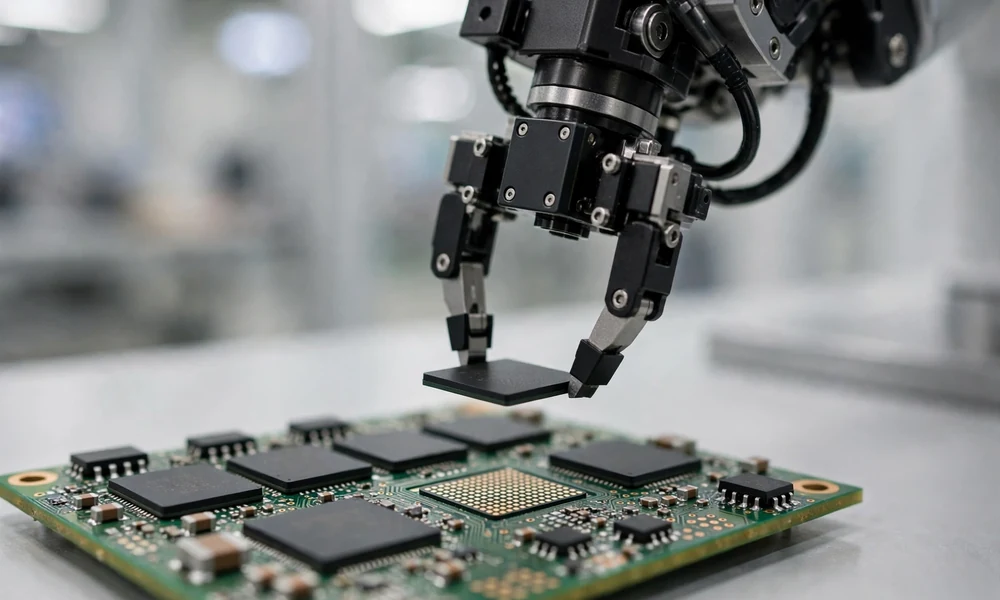
Step 3: Building the circuit board
The SSD’s printed circuit board is made separately, with fine copper traces etched into fibreglass. Onto it go the memory packages, a controller chip, and — on many drives — a small DRAM cache chip that helps the controller keep track of where everything is stored. The controller is the drive’s brain: it decides where each piece of data goes, spreads writes evenly so no cell wears out early, and corrects errors on the fly. The components are placed by pick-and-place machines that can set thousands of parts an hour, each one positioned to a fraction of a millimetre.
Step 4: Soldering and inspection
The loaded board passes through a reflow oven, where solder paste melts and then cools, locking every component in place. After soldering, the board is inspected by automated cameras that compare it against a perfect reference image, catching missing parts, crooked chips, or solder bridges invisible to the naked eye. Boards that fail are repaired by hand or scrapped. The same care that goes into an EV battery pack — where a single bad connection can ruin the whole unit — applies here at a far smaller scale, because a drive that loses data has failed at its one job.
Step 5: Firmware and first format
Before a drive can store anything, its controller needs firmware: software baked into the chip that tells it how to talk to a computer. The firmware is loaded in the factory, and the drive is then formatted and put through its first write-and-read cycle. Engineers write test patterns across the entire drive and read them back, checking that every cell holds its charge. This burn-in also weeds out early failures — the handful of drives that would have died in their first weeks of use. Drives that survive are given a serial number and a label.
Step 6: Casing, testing, and packaging
Finally, the board is fitted into its case. A 2.5-inch SATA drive gets a slim metal shell; an M.2 drive, the stick-shaped kind in most modern laptops, often ships bare, with only a label on top. The finished drive is tested once more at full speed, measuring how fast it reads and writes and how it behaves when it gets hot. Only drives that meet their rated speeds are boxed. From wafer to shelf, the whole process can take months — most of it spent waiting for silicon to be printed, layer by layer, in the dark.
Specs
| Specification | Typical figure |
|---|---|
| Capacity | 500 GB to 8 TB in consumer drives |
| NAND layers | 176–232 layers in current 3D NAND |
| Form factor | M.2 2280, or 2.5-inch SATA |
| Interface | NVMe over PCIe, or SATA |
| Read speed | Up to about 7,000 MB/s on NVMe drives |
| Write speed | Up to about 6,000 MB/s on NVMe drives |
| Endurance | 300–1,200 TB written, depending on model |
| Power use | Roughly 2–8 watts under load |
Price
A 1 TB NVMe solid-state drive typically costs roughly $60 to $120, while a 2 TB drive costs around $110 to $220 — these are estimates, and prices move with the memory market, so they can rise or fall sharply within a year. Larger 4 TB and 8 TB drives cost considerably more, and enterprise drives built for servers can cost several times the consumer price. The price per gigabyte has fallen by more than ninety per cent in a decade, which is why SSDs have replaced hard drives in almost every new laptop.
A Rare Fact
An SSD never truly erases data the way you might think. When you delete a file, the controller usually just marks its cells as free and waits — the old charge stays there until the cells are needed again. That is why forensic experts can sometimes recover deleted files from a drive, and why the most secure way to destroy an SSD is to physically shred it. Some data centres do exactly that, feeding retired drives into industrial shredders rather than trusting any software wipe.
The SSD is the quiet workhorse of modern computing: no noise, no spin, no drama. Its cousin in the world of stored energy faces a different challenge — see how a solid-state battery is made — but both rely on the same idea of trapping energy or information in layers too small to see. The next time your computer boots in seconds, remember the tower of memory cells, the stacked chips, and the months in the cleanroom that made it possible. Keeping it cool matters too, as the laptop vapour chamber specs show.


